 PhotonMark
 FAQ
FAQ
What is PhotonMark AI Chat, and do I need to install Codex or ChatGPT?
PhotonMark AI Chat is a browser-based chat interface for supported PhotonMark Codex models. It is especially useful when you do not want to install the Codex App, ChatGPT desktop client, or CLI: a current web browser is all you need.
Sign in with your existing PhotonMark Cloud Account; no additional registration is required. Select PhotonMark Codex and a supported model such as GPT-5.6 Luna, Terra, or Sol, then start chatting.
Native web search is available without entering a Serper, Firecrawl, Jina, OpenAI, or other third-party API key. When you need current information, ask the model to search the web. A successful search costs USD $0.001 under the existing Web Search rule; ordinary model usage is billed separately to the same Codex Pay balance.
AI Chat has no separate balance. Model usage is deducted from your existing active Codex Pay balance and remains visible in the Codex Dashboard. The service is currently a beta and requests continue to follow PhotonMark Codex safety screening. Please contact support if you see login, model-selection, interrupted-response, or billing-display problems.
Is this a relay, or does it provide quota? Should I choose Link, Pay, or Boost?
The key difference is quota source and billing. Link is a relay / transparent proxy for users who already have Codex quota but do not want to handle network/VPN themselves, at USD $0.25 per week. Pay uses PhotonMark managed quota, suitable for users without a paid ChatGPT account. Boost uses your own Codex quota first, then supplements it with PhotonMark balance when needed.
Boost first uses the Codex quota in your official account without charging your PhotonMark balance. When your own quota is insufficient or restricted, it supplements with Boost balance. The recommended TOML keeps the built-in openai provider and places the proxy token in the dedicated URL so existing chats remain in the same provider history scope.
Your own account's Codex availability is determined by OpenAI, not by PhotonMark as a fixed number. Some accounts may see both a shorter 5-hour rolling window and a longer weekly or plan-cycle quota. The actual remaining quota, recovery time, and limit banner depend on what your OpenAI account shows.
If you already have an official account and Codex quota and only need stable proxy access, choose Codex Link.If you do not have a paid ChatGPT account and want to use PhotonMark managed quota directly, choose Codex Pay.If you have your own account but Codex quota is not enough and want PhotonMark to supplement it when needed, choose Codex Boost.
Does Link record token usage?
No. Link is a transparent relay service and is not used for balance billing. Pay and Boost record billable usage.
Does PhotonMark Codex replace models or use reverse-engineered interfaces?
No. PhotonMark Codex is a dedicated access service for the official Codex client. It does not silently replace models and does not reverse-proxy internal interfaces of Cursor, Kiro, GitHub Copilot, or similar clients to imitate official capability. Link transparently forwards the user's own ChatGPT or Codex requests; Pay and Boost use PhotonMark managed Codex authorization.
Which Codex models are currently supported?
Priced models include gpt-6-astra, gpt-6.1-sol, gpt-6-sol, gpt-6-luna, gpt-5.6-sol, gpt-5.6-terra, gpt-5.6-luna, gpt-5.4-mini, gpt-5.4, and gpt-5.5. OpenAI is rolling out GPT-6 access gradually, so a listed price does not guarantee that every upstream account can call it yet. See What's New for full pricing and release updates.
GPT-6 Sol and Luna standard rates are USD $0.20 / $0.02 / $1.00 and USD $0.01 / $0.001 / $0.05 respectively per 1M input / cached input / output tokens. GPT-5.6 Sol, Terra, and Luna use the balance rates in effect immediately before GPT-6 Astra was added: USD $0.50 / $0.05 / $3.00, USD $0.20 / $0.02 / $1.20, and USD $0.02 / $0.002 / $0.12 respectively per 1M input / cached input / output tokens. GPT-6 Astra is USD $1.00 / $0.10 / $5.00 at every input length because Codex does not apply a long-context surcharge. Cache writes remain free.
If the client or upstream returns an unlisted or unknown model, the system keeps the original model name for audit and temporarily charges it at the same rate as gpt-5.5-pro until we add that model to the public billing table.
gpt-5.3-codex-spark has been withdrawn upstream by OpenAI and is no longer offered by PhotonMark; historical Spark usage keeps its original charge.
Please upgrade Codex App, Codex CLI, or IDE Extension to the latest version. Old clients may still send gpt-5.3-codex and similar deprecated models from older ChatGPT login flows. Requests may fail or may not enter PhotonMark billable usage processing correctly.
How do I test realtime voice collaboration in Codex?
Currently paused: managed Pay Realtime is unavailable while strict safety screening is enabled, because live audio cannot be screened before it is sent upstream. Requests currently fail and no Realtime session fee is charged; we will announce when it returns. The notes below apply only if it is reopened.
The experimental Codex Realtime V3 workflow was opened to authenticated Pay users as a beta. It lets you start a realtime voice conversation in Codex so spoken instructions can participate in the coding workflow. This is a usable beta, but the current gpt-live-1-boulder-alpha route is experimental and may be adjusted, paused, replaced, or withdrawn.
Use a current Codex release and keep the normal Pay openai_base_url at https://codex.photonmark.com/openai/v1. Add the following user-level experimental settings, then fully restart Codex:
experimental_realtime_ws_base_url = "https://codex.photonmark.com/openai/v1/live"
experimental_realtime_webrtc_call_base_url = "https://codex.photonmark.com/openai/v1"

[features]
realtime_conversation = true

[realtime]
version = "v3"
type = "conversational"
Successful connections are charged to Pay balance at USD $0.01 per connected minute, settled to the second. The first 10 seconds of every session are free and each session is limited to 10 minutes. Failed call creation, HTTP 401/502 errors, or attempts without a successful sideband connection incur no Realtime session charge. Tests completed before this pricing launch are not charged retroactively. Ordinary backend model or tool usage initiated during the conversation remains separately billable at its published rate.
Keep early tests short and do not use the beta for emergency or safety-critical work. If it fails, report the test time and timezone, whether call creation succeeded, whether microphone audio was sent or received, the exact error, and the cf-ray value if available. Never post your Pay API Key.
Why does the latest Codex or GPT-5.6 not use the built-in web search tool?
Current Codex releases can execute the built-in web.run tool through the standalone alpha/search endpoint. PhotonMark supports this endpoint for Link, Pay, and Boost. First update Codex, then run the recommended Dashboard installer; it keeps model_provider = "openai" and requires no local hotfix or injected tool schema. The installer-managed Pay catalog only adds the PhotonMark Gemini picker entries and does not replace or inject tools.
If you must keep an old [model_providers.*] block, its display name must be the exact case-sensitive name = "OpenAI". Values such as PhotonMark Codex Pay, custom, OpenAi, or a gateway name can prevent Codex from exposing the standalone search tool. Changing this name also enables OpenAI-style remote compaction, which may consume the applicable official or managed Codex quota.
If search still fails, remove local gateway request mutators that append fields such as a session id to alpha/search and remove unofficial tool-injection or model-catalog patches; keep the catalog generated by the PhotonMark installer. Restart Codex and test again. A successful standalone search follows the existing web-search price: Link has no balance charge; Boost using the user's own official quota does not deduct PhotonMark balance; Pay or Boost managed fallback charges USD $0.001 per successful search call.
How can I use the CLI when Codex cannot generate an image directly?
You can use the Codex Pay OpenAI-compatible endpoint as a CLI fallback. The commands below are for a macOS or Linux bash/zsh terminal. Set both environment variables before starting Codex:
export OPENAI_API_KEY='your PhotonMark Pay API Key'
export OPENAI_BASE_URL='https://codex.photonmark.com/openai/v1'
Replace the first placeholder with the current PhotonMark Pay API Key shown in your Dashboard. Do not put the real Key in a task prompt, screenshot, chat message, or code repository. These environment variables apply only to the current shell and programs started from it.
Start codex from the same terminal, then create a new task. An already-open Codex process normally will not inherit environment variables set later. In the new task, explicitly request CLI generation, for example:
$imagegen use the CLI to generate: a red ceramic cup on a light grey background, with no text, no logo, and no watermark.The words use the CLI to generate are important. This is a fallback for cases where direct image generation is unavailable or fails; it is not required for every image task. Image generation through this Pay endpoint is charged to the Pay balance by image model, quality, size, and quantity. See the OpenAI-compatible API page for API details and the pricing page for current rates.
Can PhotonMark Codex guarantee bypassing OpenAI risk controls?
No. PhotonMark Codex provides stable proxy access, service configuration, and prepaid quota management, but does not guarantee bypassing OpenAI or ChatGPT risk controls, quota limits, regional policies, or account reviews. Users must still follow OpenAI terms and applicable law, and must not use this service for violations, abuse, restriction evasion, or other non-compliant purposes.
Where should I put the configuration?
Use the automatic installer in the Dashboard. It finds and safely updates the user-level Codex config; users do not need to locate or edit the file themselves. Project-level .codex/config.toml cannot reliably override provider and base-URL settings.
PhotonMark recommends the built-in openai provider for all three services. The Pay installer keeps that provider, configures the fixed /openai/v1 endpoint, and adds the PhotonMark Gemini models to the picker automatically; the API Key is entered separately in Codex. Link / Boost includes its proxy token in openai_base_url so ChatGPT authorization is preserved without changing providers.
Legacy Link / Boost custom-provider blocks remain compatible, but they change model_provider and may hide chats created under the built-in OpenAI provider from the normal history list. Use them only to maintain an existing installation.
How do I configure Codex Pay in CC Switch?
This refers to farion1231/cc-switch. The screenshot below is a sanitized, field-by-field reference based on a verified user setup. In CC Switch, create or edit the Codex provider and fill the fields in this order:
- Provider name:
photonmark. - Website URL:
https://codex.photonmark.com/. - API Key: paste the current Pay API Key from the Dashboard. Never use a key from a screenshot or share it with anyone.
- API request URL:
https://codex.photonmark.com/openai/v1(the complete URL, including/openai/v1). - Default model: choose a currently supported Codex model, such as
gpt-5.5. - Upstream format: choose Responses (native).
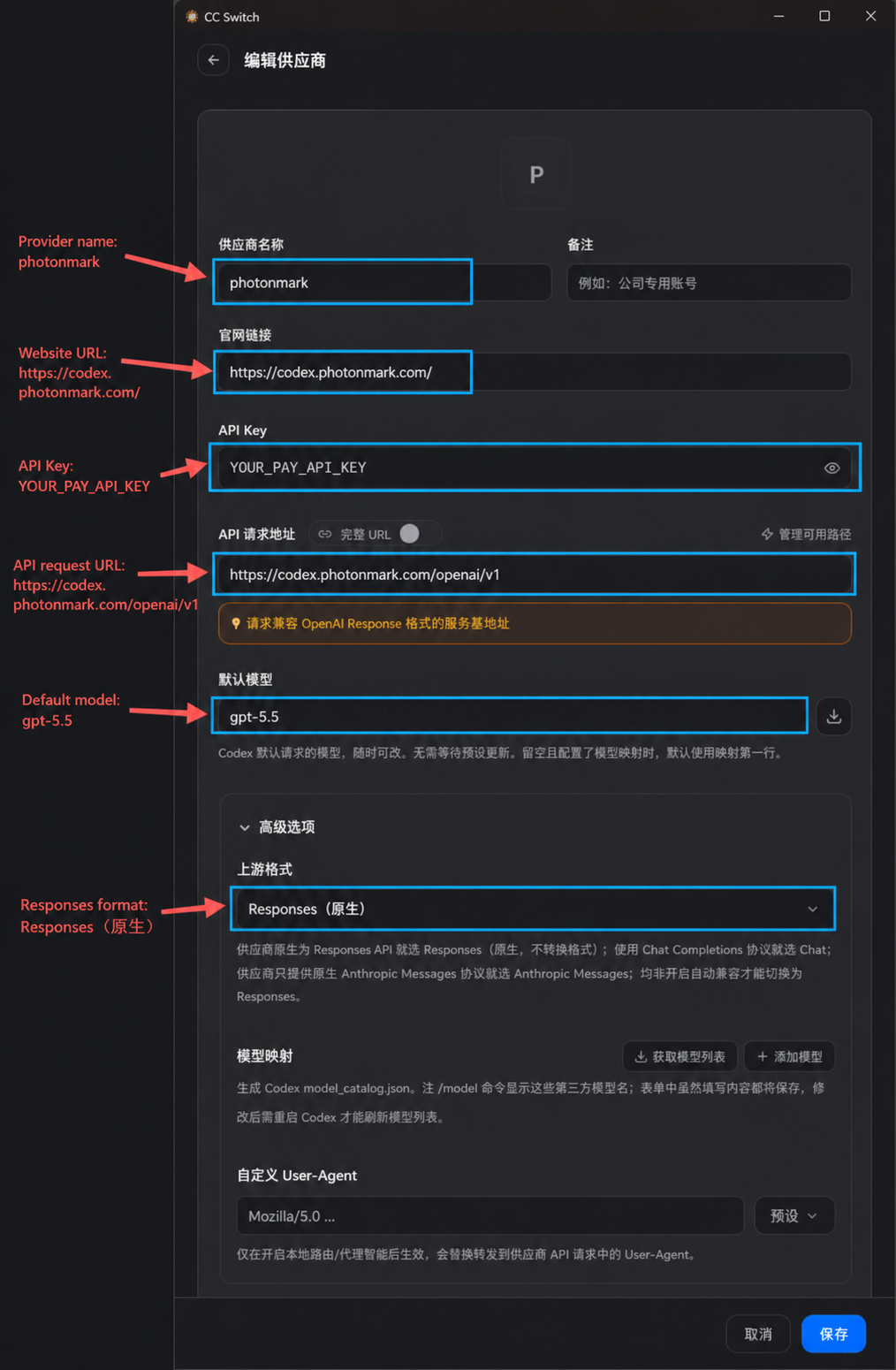
After saving, restart Codex and test a new task. Pay still uses the built-in openai provider in the final user-level config.toml; CC Switch is only being used to enter the compatible endpoint and key. The Dashboard installer remains the recommended way to install the PhotonMark Gemini picker entries and to repair a rewritten config.
For Link or Boost, do not copy the Pay API-key setup. Use the complete service-specific configuration and installer generated by the Dashboard, because those services use a credentialed URL and (for Boost) your own Codex / ChatGPT authorization. If a tool changes the provider or hides existing chats, rerun the matching Dashboard installer and verify the final config.toml.
Link / Boost URL reference: the request URL is the complete Dashboard-generated address containing the service, user, and proxy token, for example https://codex.photonmark.com/backend-api/codex-SERVICE/u/PROXY_USER/t/PROXY_TOKEN. Never construct it manually or exchange values between accounts.
How do I connect OpenCode to Codex Pay, and is the strip-max-tokens plugin still needed?
In OpenCode, use https://codex.photonmark.com/openai/v1 as baseURL, and use the Pay proxy token as apiKey. When calling the Responses API, the provider's npm should be @ai-sdk/openai.
strip-max-tokens.ts was previously used to remove max_output_tokens; it is no longer needed. Users who installed it can remove the plugin and restart OpenCode; leaving it in place temporarily will not affect usage.
PhotonMark accepts max_output_tokens, but removes it before forwarding to Codex upstream, so it is not enforced as a hard upstream output limit. For a complete configuration example and compatibility boundaries, see the OpenAI-compatible API page.
Can I remotely control Codex App from iPhone, iPad, or Android?
Yes. OpenAI Codex Remote connections support using the ChatGPT mobile app to control a connected Mac or Windows Codex App host. The phone does not run PhotonMark service directly; it sends instructions, approvals, and follow-ups to the logged-in, online, awake computer. Project files, commands, plugins, MCP, browser, and Computer Use all come from that host.
Recommended: open the latest Codex App on the computer, go to Settings > Connections, choose Set up Codex mobile and scan with your phone to complete binding. The phone needs the latest ChatGPT app and the same ChatGPT account and workspace. This flow starts from Codex App and cannot be completed with Codex CLI or IDE Extension alone.
If your user-level config.toml already has the three lines below, you can keep them. They usually help the Codex host support remote-connection capabilities and reduce the chance of sleep during long tasks:
[features]
prevent_idle_sleep = true
remote_connections = true
remote_control = true
But do not rely on these three lines alone to decide remote control is enabled. In current public config references, the stable visible option is prevent_idle_sleep,remote_control is mainly a feature flag for older config compatibility, and remote_connections may come from specific client versions or app-written config. Whether remote control actually works still depends on Codex App Connections settings and the connection status shown in ChatGPT mobile.
If I used a third-party API key to log in to Codex App, can I still use mobile remote control after switching to Pay?
Codex App can log in with an OpenAI API key. This fits some local Codex workflows, but it uses your own OpenAI Platform API bill, not ChatGPT plan quota and not PhotonMark Pay balance.
For mobile remote control, the desktop Codex App host and the ChatGPT mobile app still need the same ChatGPT account and workspace that can log in normally. API-key login is not the same as completing ChatGPT mobile authorized-device binding.
Complete Codex App remote-mobile pairing with the ChatGPT account first. Then run the Codex Pay installer from the PhotonMark Dashboard so model requests use Pay and the PhotonMark Gemini models are added to the picker. Users do not edit config.toml manually. PhotonMark configuration changes only the model request path; it does not bypass ChatGPT account sign-in.
If a free ChatGPT account is blocked by phone verification, MFA, SSO, passkey, or another account check, PhotonMark Pay cannot bypass OpenAI account verification. Use an account that can already log in to ChatGPT mobile and see Codex, or complete OpenAI's account verification flow first.
What should I do if Codex Pay reports invalid_api_key or Incorrect API key?
Codex Pay uses PhotonMark-managed Codex authorization and does not require your own OpenAI Platform API key. Rerun the Dashboard Pay installer, then enter the current Pay API Key through Sign in another way → Use API Key and restart Codex. If invalid_api_key or Incorrect API key still appears, clear the old key through the Codex sign-in UI and enter the current one again; do not add the key to TOML.
Boost needs the user's own Codex / ChatGPT auth to use the user's own quota first. If the official Codex message-limit banner appears, the request may have been blocked locally by the client before reaching the PhotonMark proxy.
Can I send the dedicated config to someone else?
No. Pay API Keys, Link / Boost token-bearing URLs, complete TOML, and installer scripts are access credentials. Do not publish, forward, or commit them to a public repository. If you suspect a leak, rotate the token in the Dashboard or contact support.
Does PhotonMark record my Codex content?
When you choose a Google Gemini model through Pay, your request content is sent to Google Vertex AI for inference.
Normally, PhotonMark does not record or store project materials, prompts, or outputs you process through Codex, and we do not use that content for model training, general analysis, or secondary processing. We retain only the account, purchase, authorization, and request metadata required to operate the service, plus model, token, and tool-call statistics required for billing.
Exception: when a Pay or Boost request actually uses PhotonMark managed quota, the complete user-message history visible in the current task request, together with image-generation or image-edit prompt text, may be submitted to automated safety screening before the model request is sent. Image pixels and tool outputs are not screened by the current gate. A blocking safety result permanently stops only that task; start a new task or fork from before the blocked request to continue. Safety-screening input is transient: the local safety-event log stores metadata and byte counts, not prompt or transcript content, and screened content is not used for model training. Managed Realtime is unavailable because its live media cannot be pre-screened by this gate. See the full privacy policy.
How long is Pay / Boost balance valid?
New top-ups through all payment methods now have 30-day validity. An existing later expiry date is preserved. For smaller top-ups, PayPlus offers Alipay and WeChat Pay from USD $1, with a 2% payment surcharge and credit equal to 1.734 times the base amount.
Each purchased balance is valid for 30 days. Through Stripe, users can top up $5, $10, $20, $30, up to $100. Purchases of $10 or more receive an extra 70% bonus credit, for example $20 becomes $34 and $100 becomes $170; $5 payments do not receive the bonus. A new top-up merges unused balance and sets expiry to 30 days after payment, preserving the existing expiry if later.
Can I monitor Pay / Boost balance and expiry by API?
Yes. Pay and Boost both provide a read-only balance status API. Use the matching service proxy token from the dashboard as the Bearer token. The response includes service status, active flag, remaining balance, prepaid amount, used amount, expiry time, and seconds remaining.
Tokens are service-scoped: a Pay token can only access the Pay status endpoint, and a Boost token can only access the Boost status endpoint. Do not commit tokens to public repositories or frontend pages.
curl -H "Authorization: Bearer <your PhotonMark proxy token>" https://codex.photonmark.com/api/v1/services/pay/status
curl -H "Authorization: Bearer <your PhotonMark proxy token>" https://codex.photonmark.com/api/v1/services/boost/status
Can I download historical usage by API or on a schedule?
Yes. Create the account's one active read-only key under Dashboard → Usage & billing, then call GET /api/v1/usage/charges for JSON or /api/v1/usage/charges.csv for CSV. The API supports timezone-aware from/to, up to 10,000 rows per page, cursor pagination, and exact filters for service, model, agent, version, session, and status. Complete commands are shown once after creation. JSON and CSV share a limit of 3 requests per 60 seconds per key. This key cannot call models or spend balance.
Requests can opt into agent labels through metadata.photonmark_agent, metadata.photonmark_agent_version, and metadata.photonmark_session_id. Use opaque identifiers without prompts, personal information, or secrets. See the Usage API examples.
Why does the dashboard separate model and cached input?
Different models have different prices; cached input is usually priced separately from normal input. We record usage fields returned by each upstream response. Cached input, output, and reasoning all come from upstream usage statistics; reasoning is included in output and is not charged again separately.
Does Fast mode increase token usage?
No. Fast mode affects the service tier and credit/billing multiplier, not token statistics. Dashboard input, cached input, and output tokens remain the real upstream usage. gpt-6-astra, gpt-6.1-sol, gpt-6-sol, gpt-6-luna, gpt-5.6-sol, gpt-5.6-terra, gpt-5.6-luna, gpt-5.4, and gpt-5.5 are billed at 2.5x the applicable standard cost. GPT-6 Astra and GPT-5.6 have no long-context surcharge.
When do long-context rates apply?
GPT-6 (Astra, Sol, Luna) and GPT-5.6 have no long-context surcharge: their standard rates apply at every input length. Other models listed in the long-context table use their long-context rates for the entire request only when input tokens strictly exceed 272K. Output tokens do not count toward the threshold. See the pricing page for current model rates.
Is web search billed separately?
Yes. If a Codex request actually calls the OpenAI web search tool, the dashboard records web search calls and web search cost. Current billing is 10% of OpenAI's web search price, USD $0.0010 per web search call, deducted from Pay / Boost balance. Input tokens from search content are still billed by the selected model's input / cached input rules.
Does a Pay API Key need separate image permission, and why is gpt-image-2 absent from /models?
No separate activation is required. Every active Pay proxy token can call POST /openai/v1/images/generations and POST /openai/v1/images/edits, using the same Pay balance as text requests. There is no separate image permission application or image-only top-up.
GET /openai/v1/models currently lists the text and Codex model catalog rather than every image tool model. The absence of gpt-image-2 is therefore not a permission signal. See the complete Image API notes.
Which Image API parameters and 4K sizes are supported?
gpt-image-2 supports quality values low/medium/high/auto, n from 1 to 10, standard and valid custom sizes, multiple reference images for edits, and an optional mask on the first image. Results are returned as data[].b64_json; PNG is the default, with JPEG and WebP also supported.
3840x2160 and 2160x3840 are accepted custom 4K requests, but output above 2560x1440 remains experimental and the returned file should be inspected for its actual dimensions. PhotonMark publishes no fixed per-key QPS or concurrency guarantee; start at concurrency 1, back off on transient 429/5xx responses, and allow at least 180 seconds for complex requests. See the full constraints.
Is image generation billed separately?
Yes. Image generation and editing are billed per returned image according to gpt-image-2 quality, size orientation, and n. The default billing fallback is medium 1024x1024 at USD $0.0530 per image; main-model tokens, if any, are billed separately. See the complete per-image price table.
How are Pay / Boost charges calculated?
Each billable response calculates normal input, cached input, and output separately by model price:base cost = (input - cached input) / 1,000,000 x input price + cached input / 1,000,000 x cached input price + output / 1,000,000 x output price. If the request uses Fast mode, multiply by the model's Fast multiplier. If web search or image generation is enabled, add the corresponding tool-call cost. Reasoning tokens are included in output statistics and are not charged again separately. Finally, charges are rounded up to four decimal places in USD.
Dashboard balance deductions use standard prices. Purchases of USD $10 or more receive 1.7x credited balance, so effective cash cost is about 1 / 1.7 of the standard deduction.
Example: if using gpt-5.4-mini, the price is input USD $0.075 / 1M, cached input USD $0.0075 / 1M, output USD $0.45 / 1M. If this response has input 20,000, cached input 10,000, and output 500, normal input is 10,000; the cost is USD $0.00075 + USD $0.000075 + USD $0.000225 = USD $0.00105, rounded up to USD $0.0011.